Ask once.
Compare every AI.
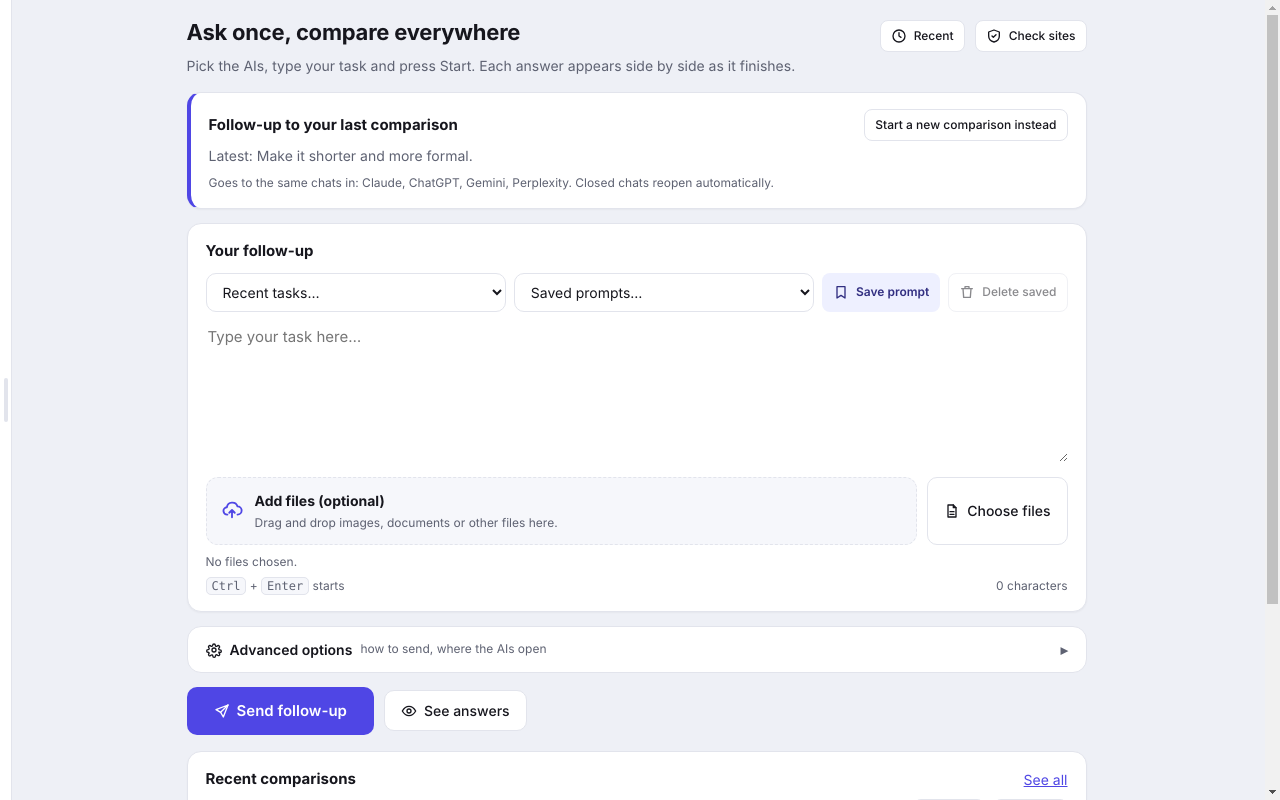
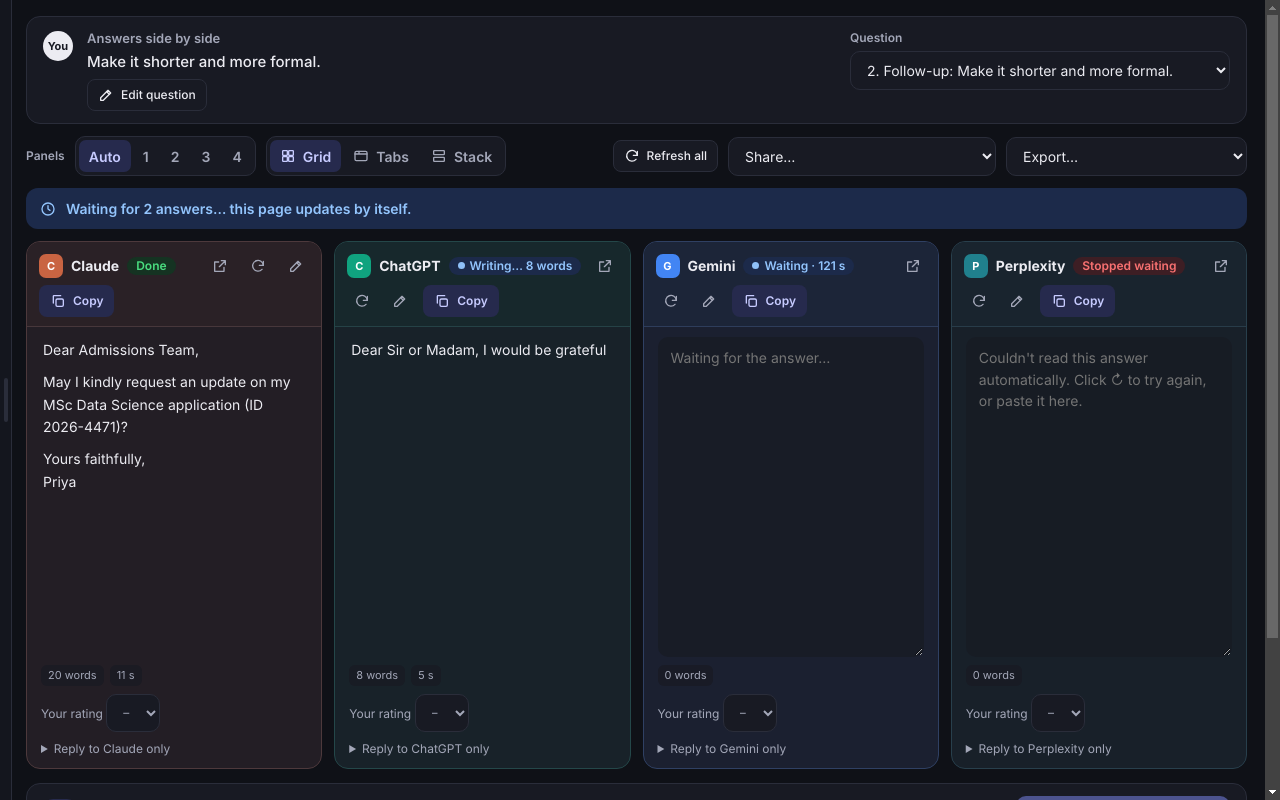
Send one question to ChatGPT, Claude, Gemini, Perplexity and more. Watch the answers arrive side by side, and let an AI judge pick the best one. Right here in your browser, nothing to install.
Works on any computer, tablet or phone. Prefer an extension? Download for Chrome.


Two ways to use it
Use it online in a second. Add the free Chrome extension, and the website can also use the ChatGPT, Claude and Gemini accounts you already have.
AI Compare online
- Works in any browser, on computers, tablets and phones
- Answers appear live, side by side
- AI judge, follow-ups, files, history, share
- Use your own ChatGPT, Claude and Gemini accounts (on a computer, with the free extension), your own API keys, or a simple plan
Chrome extension
- Uses your own ChatGPT, Claude and Gemini accounts and plans
- Chats are saved in each AI's own history
- Every feature of the AI websites: pictures, files, web search
- Chrome and Edge on Windows and Mac
Everything each AI can do. In one place.
Ask several AIs at once and see where they agree, where they differ, and which answer is best.
7 AIs side by side
ChatGPT, Claude, Gemini, Perplexity, Grok, DeepSeek and Mistral online, plus Copilot and Meta AI in the extension.
Your choice of how to pay
A simple plan, your own API keys, or the extension with the AI accounts you already have.
AI judge
Scores every answer without seeing who wrote it, then writes one improved answer from the best parts.
Images and files
Attach pictures, PDFs and documents to your question. The extension also downloads the files and pictures the AIs create.
Live, side by side
See each AI think and write in real time. Follow-ups go to all of them at once.
Private by design
No ads, no tracking. Your comparisons and API keys stay in your own browser.
How it works
Pick your AIs
ChatGPT, Claude, Gemini, Perplexity, Copilot, Grok, DeepSeek, Mistral, Meta AI.
Ask your question
Type it once, add files if you like, and press Ask.
Compare and pick
Read the answers side by side, run the AI judge, download, share.
Why not just use a credits-based AI hub?
| AI Compare | Typical credits-based hubs | |
|---|---|---|
| Uses the AI plans you already pay for | Yes | No, you buy their credits |
| Chats saved in your own ChatGPT / Claude / Gemini history | Yes | No |
| Each AI's full features (images, files, web search) | Yes, as on the real sites | Often limited |
| Blind AI judge + merged best answer | Yes | Rarely |
| Use it free with your own API keys | Yes | Rarely |
| Works on phones | Yes, online and installable | Yes |
Install the Chrome extension in 1 minute
Works in Google Chrome and Microsoft Edge on Windows and Mac.
Download
Download the AI Compare zip and unzip it into a folder you'll keep (don't delete it later).
Open extensions
In Chrome, type chrome://extensions in the address bar (Edge: edge://extensions) and switch on Developer mode at the top right.
Load it
Click Load unpacked and choose the unzipped folder. AI Compare appears in your toolbar: pin it with the puzzle-piece icon.
Sign in and ask
Sign in to ChatGPT, Claude, Gemini and Perplexity in Chrome as usual, then click the AI Compare icon and ask your first question.
Chrome may show a note about developer-mode extensions: that's normal for extensions installed from a download. A one-click Chrome Web Store version is coming soon. Don't want to install anything? Use AI Compare online.
Questions
Do I need to pay for AI Compare?
The Chrome extension is free and uses your own AI accounts. Online, you can use it free with your own API keys (you pay the AI companies directly, often a few cents a question), or sign in and buy a simple plan with no keys needed.
Is it safe to use my API keys online?
Your keys are saved only in your own browser and sent only to that AI company. A few AI companies don't accept requests straight from a web page; for those, the request passes through our server on its way, and the key is never stored or logged.
Can I use it on my phone?
Yes. Open AI Compare online on your phone. To add it to your home screen: Android, Chrome menu → Install app; iPhone, Safari → Share → Add to Home Screen.
Is my data safe?
No ads, no tracking. Your questions go only to the AIs you choose, and your comparisons stay on your device. See the privacy policy.
Which AIs work with it?
Online: ChatGPT, Claude, Gemini, Perplexity, Grok, DeepSeek and Mistral. The extension also works with Copilot and Meta AI.
Can the website use my own ChatGPT, Claude or Gemini account?
Yes, on a computer with Chrome or Edge. Websites can't use your logins on other sites by themselves, so add the free AI Compare extension once. The website then asks your own accounts for you, including paid plans like ChatGPT Plus or Claude Pro, and every chat is saved in your own history there. On phones, use your own API keys or a plan.
What if an AI website changes?
AI Compare receives fixes automatically, and can switch that AI to Fast mode until it works again.